
 |
| Press any key to boot from USB.. |
This time I will share about computer tips, which I took from what happened yesterday afternoon when going to reinstall a netbook with a fairly well-known brands. Perhaps this incident you have ever experienced. Seeing the many vendors laptops, PCs, motherboards, and other spare parts associated with the computer. But the effect on my writing today are so many types of BIOS. Because each type of BIOS would have settings for each.
I will start my post with a story about the events that I experienced. Starting from servisan netbook afternoon. With a complaint asking for the reinstall. As usual I do is turn on the netbook, with Safe Mode C data open, secure the data, restart and prepare a bootable flash Windowsnya. Therein lies the problem. When I enter a Bootable already, First Boot Priority has been my point to stick, then I restart, but what happens is it does not appear "Press any key to boot from the USB ....".
You've experienced the same thing?
Then what do you do?
If my own, directly to other alternatives. For example:
Replacing a bootable flash drive with a bootable DVD, then First Boot I navigate to the USB DVD ROM, it is still the same, no change,
BIOS settings, tooling Utik I understand, this step is nil,
Well, finally I get a simple way, actually does away with the points that number two, enter the BIOS Setting. I'm just trying to Load BIOS Defaults, and Finally, when I restart, navigate to the Boot Menu, select the flash Bootablenya be first, and finally appear "Press any key to boot from a USB ..." Then I press one button, and go to the next step to install windows.
The solution is quite simple is not it?
Only with Load BIOS Defaults,
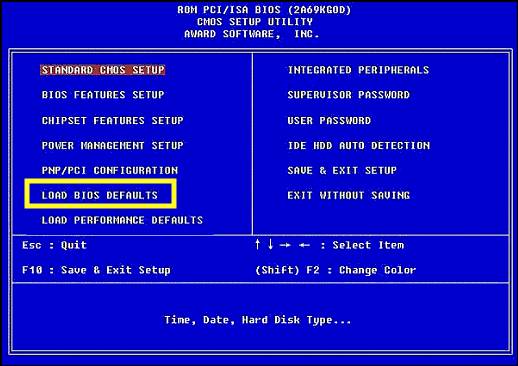 |
| Load BIOS Default |
Above solution would not hurt you to try, and good luck !!
A few articles about "How to Cope with a PC or Laptop Who Will not Go to stick Nor Windows Bootable DVD".
Hope It Is Useful!
[Hendry Sulistyo]
Tag :
Tips Computer,
Troubleshooting

0 Komentar untuk "How to Cope with a PC or Laptop Who Will not Go to Windows Bootable flash Nor DVD"